

Modern software is rarely a single application working on its own. A typical product may depend on APIs, databases, cloud infrastructure, third-party services, mobile devices, different browsers, authentication systems, and automated deployment pipelines. As these dependencies increase, maintaining software quality becomes more difficult.
This is why development teams need well-planned software testing strategies.
A strong strategy gives teams a clear way to decide what should be checked, which software areas carry the greatest risk, what should be automated, where human review is still valuable, and what conditions must be met before a release reaches users.
The objective is not to run the largest possible number of tests. A useful strategy helps a team spend its time on the software areas where failure would matter most.
This guide explains software testing strategies, software quality levels, major approaches, automation, Agile and DevOps workflows, risk management, common mistakes, and practical best practices.
What Are Software Testing Strategies?
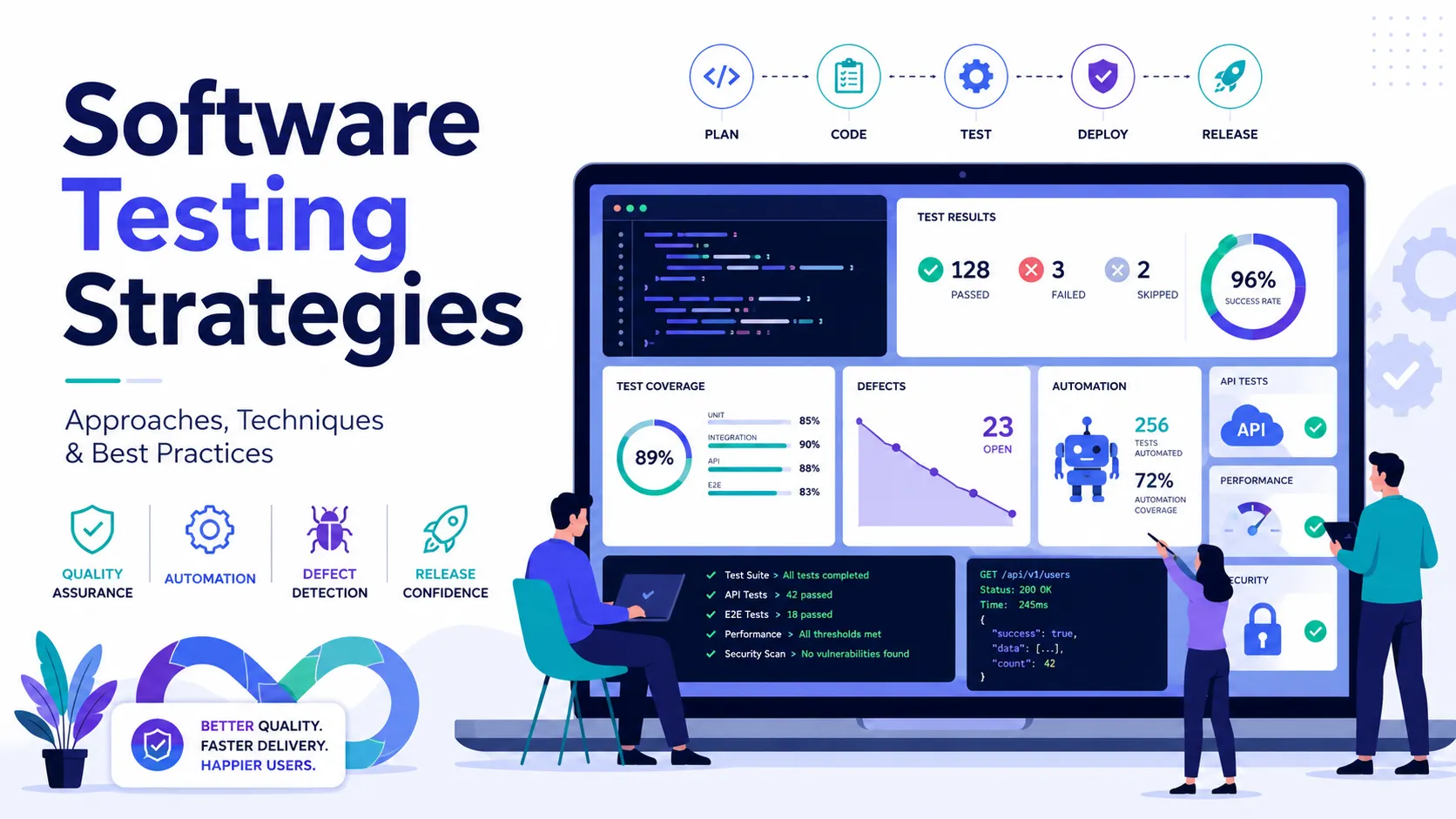
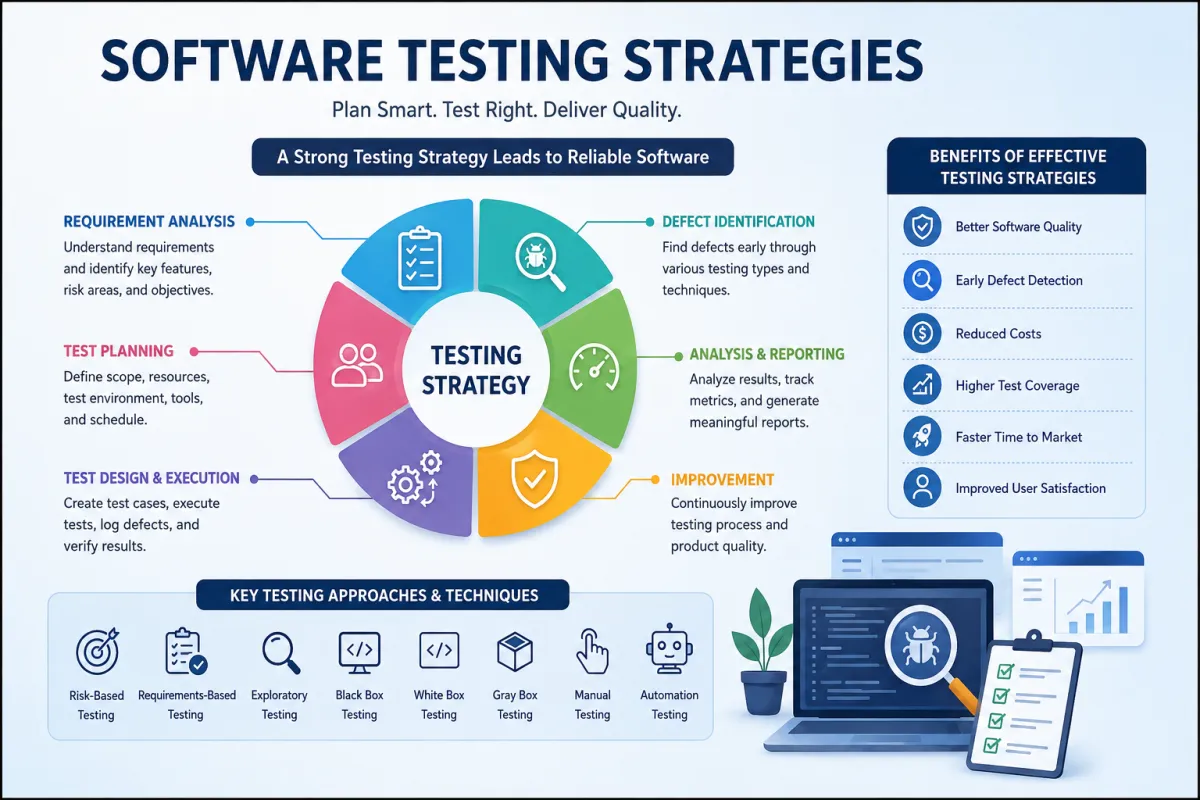
Software testing strategies are structured, high-level approaches used to manage software quality throughout the development lifecycle.
A strategy provides direction for the overall software verification process rather than describing individual test cases.
It normally answers questions such as:
- Which software components are most important?
- Which areas carry the highest business or technical risk?
- What quality standards must be achieved?
- Which checks should be automated?
- Which scenarios require human judgment?
- Which environments and tools are required?
- How should defects be prioritized?
- When is the software ready for release?
A well-designed software testing strategy helps developers, QA engineers, product managers, and stakeholders work toward the same quality goals.
Without a clear strategy, software decisions often become inconsistent. One release may receive strong security verification while another focuses almost entirely on functionality. A defined approach reduces that inconsistency.
For a broader industry perspective, Keploy also provides a useful guide to software testing strategies.
Software Test Strategy vs. Test Plan
A software test strategy and a test plan are related, but they are not the same thing.
| Area | Software Test Strategy | Test Plan |
|---|---|---|
| Purpose | Defines the overall quality direction | Defines work for a specific release |
| Scope | Product or organization level | Sprint, feature or release level |
| Focus | Risk, methods, tools and priorities | Tasks, schedule and responsibilities |
| Changes | Occasionally | Frequently |
| Main question | How will software quality be managed? | What will be checked now? |
For example, an e-commerce strategy may state that payment processing is a critical software area requiring automated regression, API verification, security checks, and manual exploration.
The test plan for a particular release would then identify the exact payment changes, assigned team members, environments, timelines, and individual scenarios.
The strategy gives direction. The plan organizes execution.
Why Software Testing Strategies Matter
Poor software quality rarely happens because teams deliberately ignore defects. Problems usually appear because priorities are unclear.
A team may spend several hours reviewing a low-impact interface feature while a critical payment integration receives limited attention.
Effective software testing strategies help teams focus on risk instead of treating every feature equally.
Better Software Quality
A structured approach allows teams to identify defects before users experience them.
Quality becomes part of development rather than something added just before launch.
Earlier Defect Detection
A problem found while a developer is actively working on a feature is generally easier to understand and correct.
The same issue discovered after deployment may require investigation, log analysis, customer support, a production patch, and another release.
Earlier feedback reduces this additional work.
More Predictable Releases
A strategy establishes clear software release conditions.
Instead of deciding that a product “looks ready,” teams can use measurable criteria such as:
- critical workflows completed successfully;
- no unresolved critical defects;
- required security checks completed;
- important API integrations verified;
- agreed performance limits achieved.
Better Resource Allocation
Not every software feature deserves the same level of attention.
A payment system, authentication service, or customer database normally carries more risk than a cosmetic profile setting.
A strategy allows resources to follow actual software risk.
Core Principles Behind a Strong Software Strategy
Several principles make software testing strategies more effective.
Software Verification Cannot Prove Perfection
Passing all known checks does not prove that an application has no defects.
It simply shows that the software behaved correctly under the scenarios that were evaluated.
Unknown combinations and edge cases may still exist.
Checking Every Scenario Is Impossible
Even a simple form can accept a huge number of input combinations.
Teams therefore choose important scenarios based on:
- business impact;
- user behavior;
- software complexity;
- historical defects;
- boundaries;
- security exposure;
- likelihood of failure.
Quality Work Should Begin Early
Software quality should not begin after development is complete.
Requirements can contain ambiguity. Architecture can introduce security risks. APIs can create integration problems. Database choices can affect performance.
Identifying these issues early usually reduces expensive rework later.
Risk Is Not Distributed Equally
Some software modules naturally deserve more attention.
Typical high-risk areas include:
- authentication;
- payments;
- permissions;
- data migration;
- third-party integrations;
- complex calculations;
- frequently changed modules;
- legacy software.
Good software testing strategies recognize these differences.
Levels of Software Quality Checks
Software is normally evaluated at several levels
Unit Level
Unit-level checks focus on individual functions, classes, or components.
For example, a discount calculation function might be evaluated using normal values, zero values, invalid inputs, maximum limits, and different customer types.
These small checks provide developers with fast feedback.
Integration Level
Modern software depends heavily on connected systems.
Integration-level verification examines whether components communicate correctly.
Examples include:
- frontend to API;
- API to database;
- software to payment gateway;
- one microservice to another;
- application to email provider.
A component may work correctly on its own and still fail when connected to another service.
System Level
System-level verification examines the application as a complete product.
Instead of looking at one component, the team follows complete workflows.
For example:
Registration → Email Verification → Login → Profile Setup → Dashboard
This shows whether different parts of the software work together correctly.
Acceptance Level
Acceptance evaluation focuses on business and user needs.
A feature may technically meet its specification but still fail to solve the user's real problem.
This is why business stakeholders or representative users are often involved before major releases.
Key Software Testing Strategies
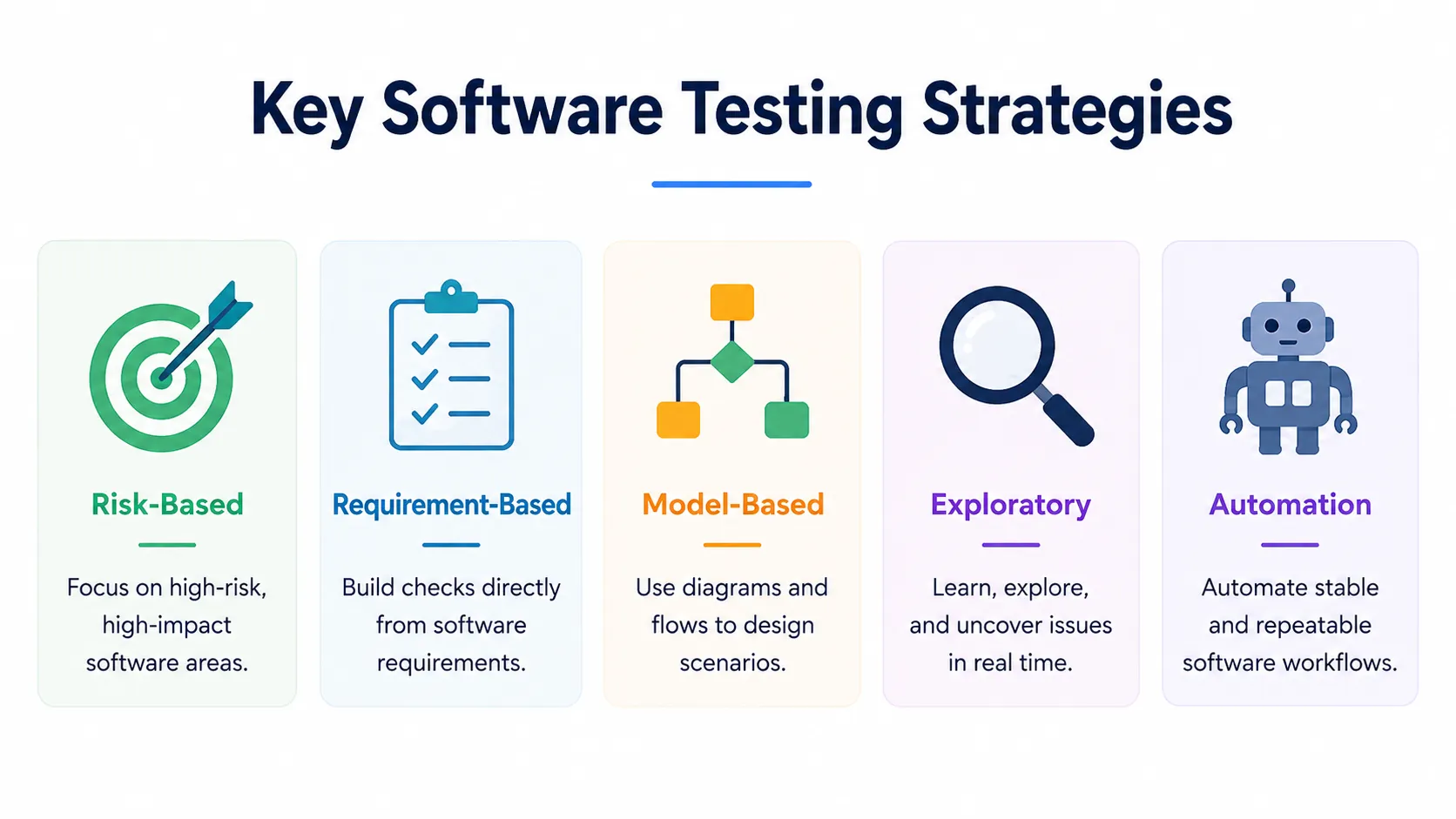
Different projects need different approaches. Most real-world software testing strategies combine several methods.
1. Risk-Based Strategy
Risk-based software evaluation gives greater attention to areas where failure is both likely and damaging.
A simple model is:
Risk = Probability of Failure × Impact
For an online store:
| Software Area | Failure Probability | Impact | Priority |
| Payment | High | Critical | Very High |
| Login | Medium | High | High |
| Product Search | Medium | Medium | Medium |
| Profile Theme | Low | Low | Low |
Giving all four features equal attention would waste resources.
Risk-based software testing strategies concentrate effort where software failure could create the greatest business or user impact.
2. Requirement-Based Strategy
Requirement-based verification connects software requirements directly to quality checks.
For example:
REQ-LOGIN-01 → User login requirement
TC-LOGIN-01 → Valid credentials
TC-LOGIN-02 → Invalid credentials
TC-LOGIN-03 → Locked account
This creates traceability.
A team can clearly see which requirements have been covered and which still need work.
The approach is particularly useful for enterprise software, regulated systems, financial products, and projects with strict contractual requirements.
3. Model-Based Strategy
Model-based approaches use diagrams or models to represent expected software behavior.
These may include:
- decision tables;
- state diagrams;
- workflow models;
- process diagrams.
Consider an order system:
Created → Paid → Packed → Shipped → Delivered
Alternative paths might include:
Created → Cancelled
or
Paid → Refunded
A visual model helps teams identify missing or invalid transitions more easily.
4. Exploratory Approach
Some software problems cannot be predicted through predefined scenarios.
Exploratory work allows an experienced QA engineer to investigate unusual behavior using product knowledge and observation.
The evaluator may:
- enter unexpected values;
- interrupt workflows;
- repeat actions quickly;
- change navigation order;
- switch devices;
- investigate confusing behavior.
Exploration is particularly useful for usability issues and edge cases that scripted checks may overlook.
Black-Box, White-Box and Gray-Box Approaches
Different software testing approaches can also be grouped according to how much internal system knowledge is available.
Black-Box
Black-box verification focuses on visible software behavior without requiring knowledge of the source code.
A login screen, for example, can be evaluated using valid credentials, invalid passwords, empty fields, incorrect email formats, and locked accounts.
White-Box
White-box work uses knowledge of the internal implementation.
Developers may evaluate code branches, conditions, loops, paths, and data flow.
This approach is commonly useful at the unit level.
Gray-Box
Gray-box work sits between the two.
A QA engineer may understand the API design, database structure, or software architecture without examining every line of source code.
It is particularly valuable for integrations, APIs, and security-related scenarios.
Functional and Non-Functional Software Quality
Strong software testing strategies should evaluate both what software does and how well it does it.
Functional Quality
Functional verification checks expected behavior.
Examples include:
- Can a user register?
- Does login authenticate the correct account?
- Is tax calculated correctly?
- Can an order be cancelled?
- Does an API return the expected response?
Non-Functional Quality
Non-functional evaluation focuses on broader software characteristics.
Performance
Performance checks may examine:
- response time;
- stability;
- throughput;
- scalability;
- resource consumption.
Security
Software security work may focus on authentication, authorization, sessions, data handling, permissions, and access control.
Usability
A technically correct feature may still frustrate users.
Usability evaluation looks at how easily people can understand and complete important tasks.
Compatibility
Software may need to work across different browsers, devices, operating systems, screen sizes, and environments.
The strategy should identify which combinations matter most to actual users.
Manual Software Checks vs. Automation
One of the most important decisions in software testing strategies is choosing what should be automated.
Automation works particularly well for:
- repetitive regression scenarios;
- API checks;
- stable business rules;
- unit-level validation;
- frequently executed workflows;
- CI/CD quality gates.
Human review remains useful for:
- exploratory investigation;
- usability;
- visual quality;
- rapidly changing features;
- unusual one-time scenarios.
The goal should not be to automate everything.
A better question is:
Will automating this workflow provide enough repeatable value to justify its maintenance?
Keploy's test automation guide provides additional context on using automation for repeatable software validation and faster development feedback.
Software Testing Strategies in Agile
Agile development integrates software quality work throughout each sprint.
Instead of developers building an entire feature and handing it over at the end, developers and QA engineers work more closely throughout development.
A typical Agile flow may look like:
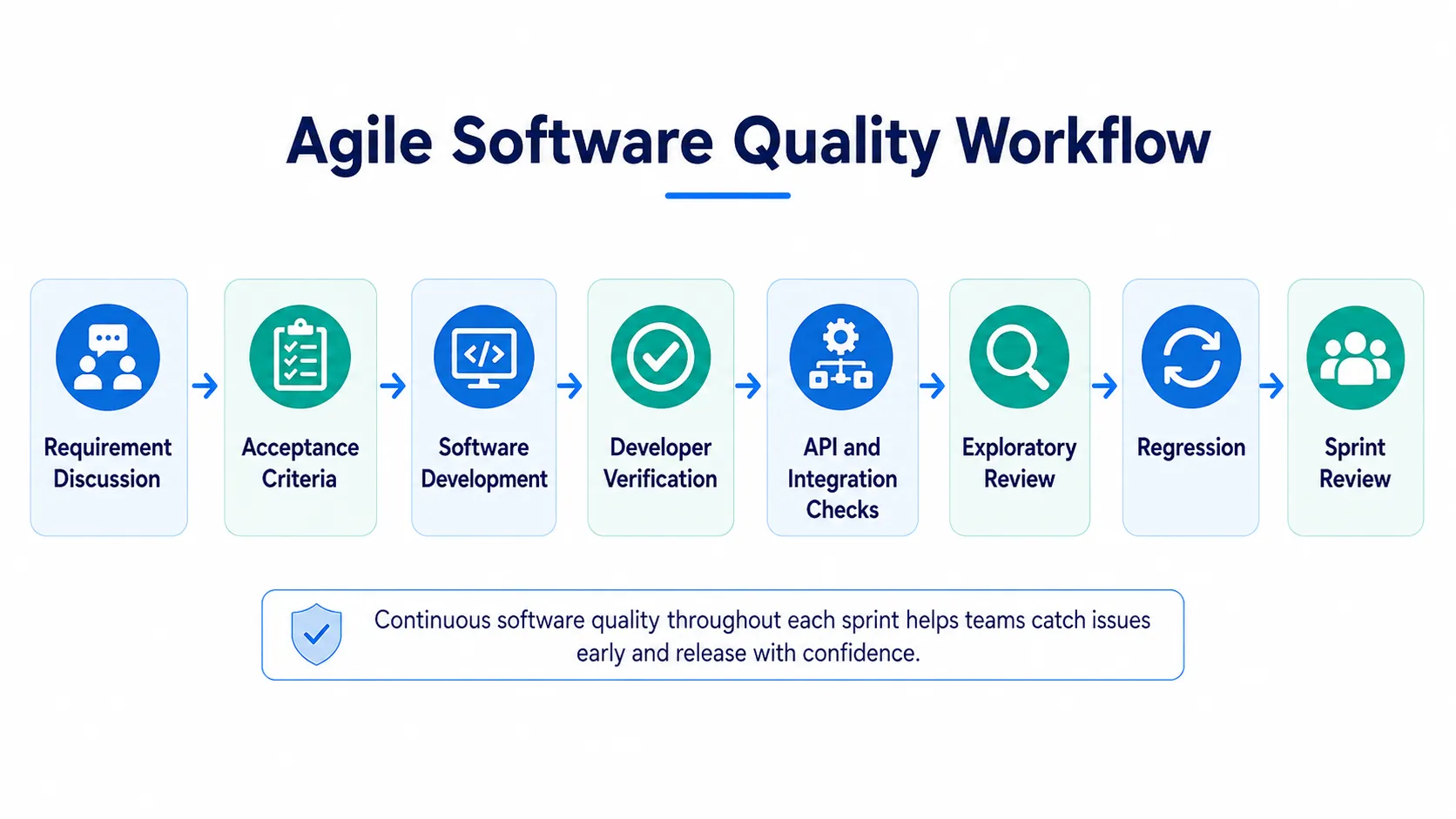
This provides faster feedback and makes defects easier to correct while development context is still fresh.
Software Testing Strategies in DevOps
DevOps takes continuous quality further by integrating automated checks into the software delivery pipeline.
A common pipeline may follow:
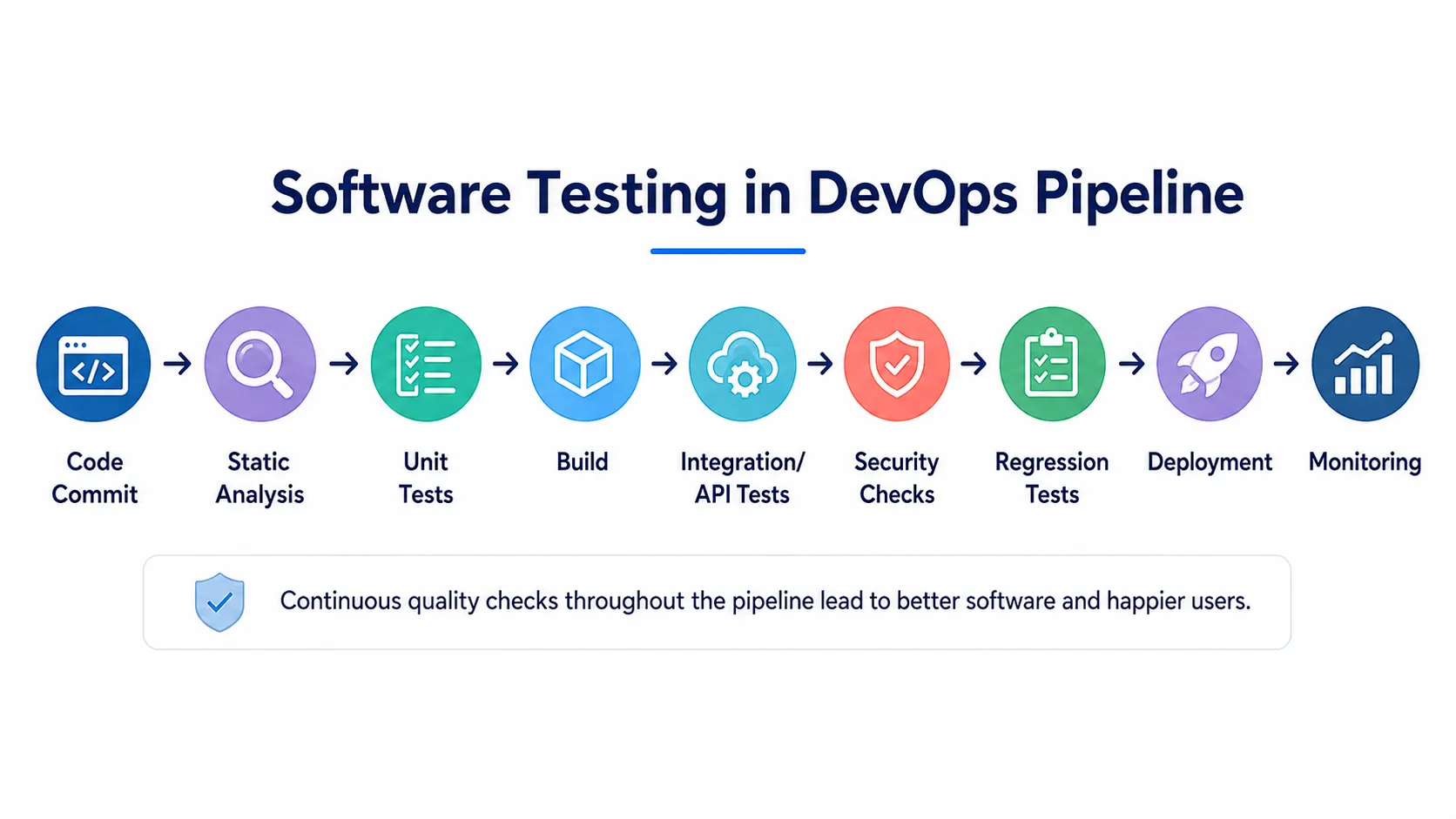
Fast checks can run after every code change, while more expensive software validation can run later in the pipeline.
Monitoring after deployment also provides useful quality feedback from real environments.
How to Create a Software Testing Strategy
A useful strategy does not need to be extremely long. It needs to make the important decisions clear.
1. Understand the Software
Identify:
- what the application does;
- who uses it;
- which workflows matter most;
- what data it handles;
- which external services it depends on.
2. Identify Critical Risks
Look for areas involving:
- sensitive information;
- financial impact;
- complex logic;
- external dependencies;
- frequent defects;
- high customer usage.
3. Define Scope
Specify which software components are included, such as the web application, APIs, database, admin panel, mobile application, and external integrations.
4. Select Appropriate Approaches
Combine methods according to project needs.
A strategy may use risk-based prioritization, requirement traceability, automation, exploratory work, security evaluation, and performance checks.
5. Define Automation
Prioritize stable, repetitive, and high-value workflows rather than chasing an arbitrary automation percentage.
6. Establish Release Criteria
Example exit criteria might include:
- critical workflows completed;
- no unresolved critical defects;
- required regression successful;
- major integrations verified;
- security requirements satisfied.
7. Review the Strategy
Software changes over time.
Architecture, traffic, technology, security requirements, and release frequency may all evolve.
The strategy should evolve with them.
Common Mistakes
Several mistakes can reduce the value of software testing strategies.
Automating Everything
More automation does not automatically produce better software.
Automation should focus on stable and valuable workflows.
Ignoring Risk
Giving every feature equal priority wastes time and resources.
Starting Too Late
Defects found near release are often harder and more expensive to correct.
Ignoring Non-Functional Quality
A product can work functionally while still being slow, insecure, confusing, or unreliable.
Chasing Coverage Numbers
A high coverage percentage does not automatically mean the most important software risks have been addressed.
Ignoring Unstable Automation
If automated checks frequently fail for unrelated reasons, developers eventually stop trusting them.
Reliable feedback matters more than raw test count.
Software Testing Strategy Best Practices
Effective testing strategy best practices are straightforward:
- prioritize high-risk software areas;
- involve QA early in development;
- automate stable and repetitive workflows;
- keep human judgment for exploration and usability;
- define clear software release criteria;
- review defect trends;
- maintain realistic environments;
- keep critical feedback fast;
- update the strategy when software risks change.
The strongest strategy is one that helps the team make better decisions rather than creating more documentation.
Frequently Asked Questions
What are software testing strategies?
Software testing strategies are structured approaches used to manage software quality, risk, automation, verification, and release readiness throughout development.
What is a software testing strategy?
A software testing strategy defines the overall direction used to decide what should be evaluated, which areas deserve priority, and how software quality will be managed.
What is a software test strategy?
A software test strategy is a high-level framework covering software risk, quality objectives, automation, environments, approaches, and release conditions.
Which software testing approaches are most useful?
Useful software testing approaches include risk-based, requirement-based, model-based, exploratory, black-box, white-box, integration, automation, security, and performance-focused methods.
Should everything be automated?
No. Stable and repetitive software workflows are usually better automation candidates. Exploration, usability, and rapidly changing interfaces often require human judgment.
Conclusion
Effective software testing strategies are not about creating the largest possible number of test cases or using every available QA tool.
They are about making better software decisions.
A strong strategy identifies important risks, protects critical user workflows, provides fast development feedback, uses automation where it creates genuine value, and keeps human judgment where it is most useful.
As applications become more complex and release cycles become faster, structured software testing strategies become increasingly important.
The best approach is not necessarily the most complicated one. It is the strategy that helps a team find important problems earlier, understand software risk more clearly, release with greater confidence, and continuously improve the quality of the product users depend on.





Leave a Reply