

A software testing strategy explains how a team will collect enough evidence to make release decisions without testing every possible condition. It connects product risks to test coverage, environments, data, automation, ownership, and exit criteria. A useful strategy is short enough to guide daily work but specific enough to settle disagreements before release pressure begins.
This software testing strategy guide gives you a practical method, a reusable template, and a worked SaaS example. It focuses on decisions that belong at strategy level. Individual test cases, sprint dates, and execution assignments belong in a test plan.
What Is a Software Testing strategies?
A software testing strategiesis a high-level set of decisions about how testing will address product and project risks. It defines what needs strong evidence, which test levels and techniques will supply that evidence, where tests will run, and who can accept remaining risk.
The strategy should answer six questions:
-
Which failures would cause the most harm?
-
What evidence would show that each important risk is controlled?
-
Which testing methods can produce that evidence efficiently?
-
Which environments, data, tools, and skills are required?
-
What must be true before testing starts and a release proceeds?
-
Who owns each decision, exception, and unresolved risk?
This definition makes risk-based testing the starting point. Test types are possible responses to risk, not a strategy by themselves.
The ISTQB Foundation Level material places test planning, risk management, monitoring, control, completion, configuration management, and defect management within the management of test activities. ISO/IEC/IEEE 29119-3 covers test documentation. Teams can use these references for terminology and structure, then scale the documentation to the product.
What Is the Difference Between a Test Strategy and a Test Plan?
A test strategy sets the lasting rules for how quality risk is handled. A test plan applies those rules to a defined release, project, feature, or test cycle. Combining both into one document can work for a small team, but the two decisions should still be identifiable.
| Decision area | Test strategy | Test plan |
|---|---|---|
| Main question | How will testing manage product risk? | What will this testing effort execute? |
| Typical scope | Product, platform, programme, or team | Release, sprint, migration, or feature |
| Contents | Risk model, coverage approach, environment principles, automation boundaries, release evidence | Features, cases, people, dates, builds, data, and execution schedule |
| Change trigger | New architecture, risk, regulation, user behaviour, or delivery model | Scope, timeline, build, staffing, or release change |
| Approval | Product, engineering, quality, security, and business risk owners | Delivery and testing owners for the defined effort |
For example, a strategy may require automated API checks and authorization tests for all billing changes. The test plan for version 4.2 would identify the changed endpoints, supported payment paths, assigned testers, test accounts, dates, and expected results.
The test strategy vs test plan distinction prevents strategy documents from becoming stale task lists. It also stops release plans from silently changing long-term quality rules.
What Inputs Do You Need Before Writing the Strategy?
A reliable strategy starts with product context, not a preferred tool. Before writing the software testing strategy guide for a product, collect enough information to understand failure impact, system boundaries, delivery constraints, and current evidence gaps.
Useful inputs include:
-
critical user journeys and business processes;
-
architecture diagrams, service boundaries, APIs, queues, and data stores;
-
supported browsers, devices, operating systems, and regions;
-
legal, contractual, privacy, accessibility, and security obligations;
-
production incidents, escaped defects, support tickets, and failure trends;
-
release frequency, deployment method, rollback capability, and observability;
-
third-party services and the failure modes your team can control;
-
available environments, test data, tooling, time, and specialist skills.
Write down assumptions and unknowns. If the expected peak load is unknown, the strategy should not disguise that gap with a generic performance-testing statement. Record the unknown, name its owner, and state which testing decision depends on it.
A short discovery workshop can gather these inputs. Include people who understand customers, architecture, operations, security, and testing. Aim for a shared view of the failures that deserve attention.
How Do You Create a Software Testing Strategy Step by Step?
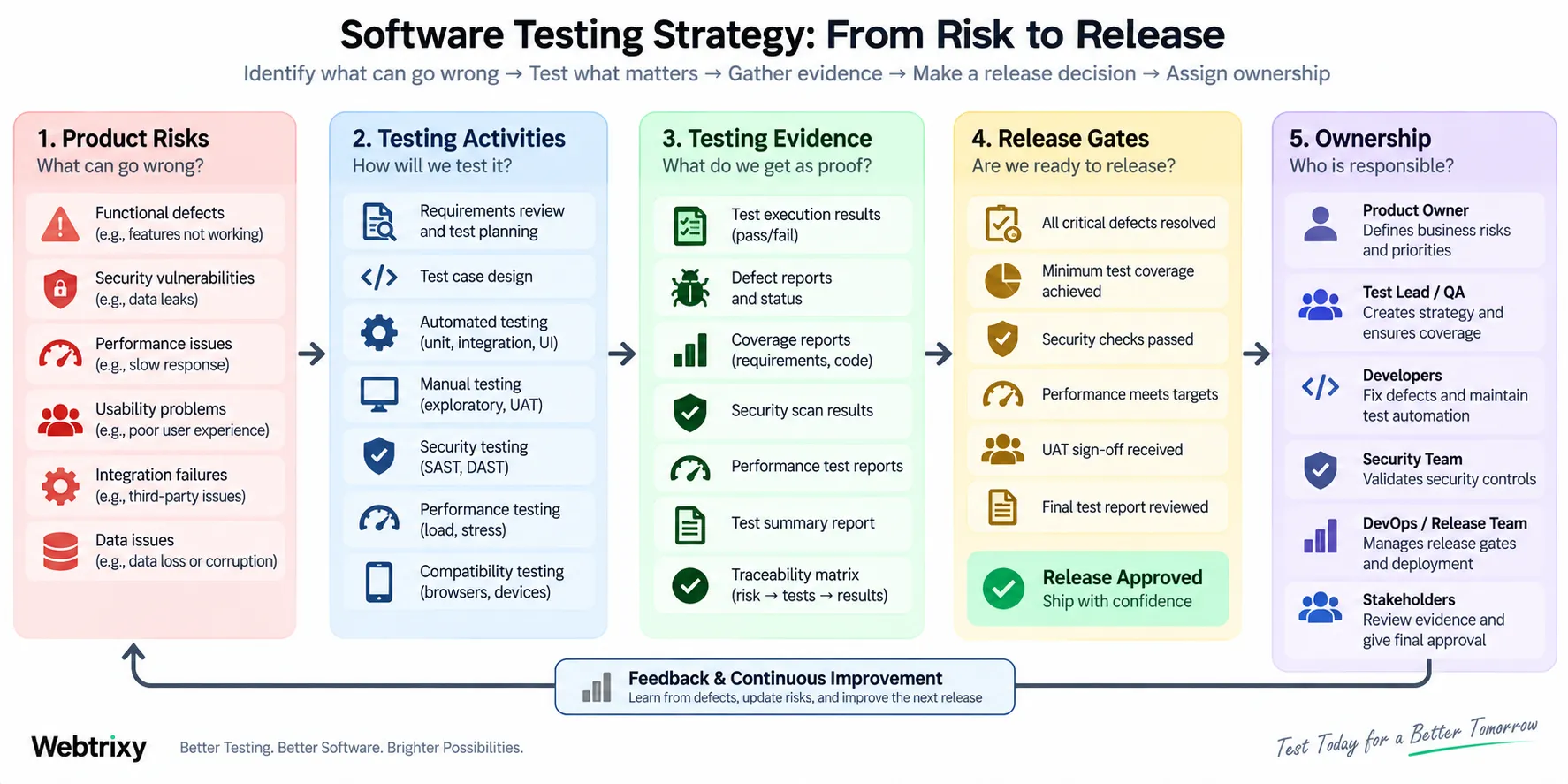
Build the strategy by moving from harm to evidence, then from evidence to execution. This software testing strategy guide uses four steps so each testing activity can be traced back to a reason.
Step 1: Turn Product Failures Into Prioritized Risks
Describe risks as specific failure events. “Payments are high risk” is too broad. “A retry charges a customer twice after a gateway timeout” gives the team something it can analyze and test.
Score each risk using a simple model. Likelihood can be low, medium, or high. Impact can consider customer harm, revenue, data, compliance, recovery time, and reputation. A separate detectability rating is useful when a failure may remain hidden for a long time.
| Product risk | Likelihood | Impact | Detectability | Priority |
|---|---|---|---|---|
| Duplicate charge after payment retry | Medium | Critical | Medium | Very high |
| User reads another account's file | Low | Critical | Low | Very high |
| Dashboard filter resets after refresh | High | Low | High | Medium |
| Avatar crop is slightly misaligned | Medium | Low | High | Low |
The numbers are prioritization aids, not proof. Review the ordering with people who can judge the business and technical consequences.
Step 2: Map Each Risk to Required Evidence
Define what would increase confidence for each priority risk. This risk-to-evidence map is the central artifact in a software testing strategy guide because it explains why a test exists.
For duplicate payments, useful evidence could include unit tests for idempotency rules, API tests for repeated requests, integration tests against a gateway sandbox, and an operational alert for conflicting transaction states. For unauthorized file access, useful evidence could include permission-matrix tests, API authorization checks, security review, and audit-log verification.
Avoid using code coverage as the sole evidence. Coverage can show which code ran during tests, but it cannot show that important business conditions were asserted correctly. Link coverage to risks, requirements, or critical journeys when the connection is useful.
Step 3: Choose the Smallest Effective Test Portfolio
Select the fastest reliable test level that can expose each failure, then add broader tests where component-level evidence is insufficient. Business-rule errors often fit unit tests, while contract failures fit API or integration tests. Cross-service journeys may require system tests. Usability questions often need human exploration.
A test automation strategy should consider execution frequency, result objectivity, maintenance cost, and feedback time. Stable checks that run on every change are strong automation candidates. Questions requiring judgment may remain manual.
This page does not repeat a catalogue of testing techniques. Read types of software testing strategies for a broader explanation of individual approaches, or use these software testing best practices to improve daily execution. In this strategy document, include a technique only when it supports a named product risk.
Step 4: Define Decision Gates and Exception Rules
Entry criteria state what must exist before a test stage can produce trustworthy results. Exit criteria state what evidence and residual-risk conditions must be satisfied before work can progress.
Useful entry criteria may require a deployable build, stable environment, known configuration, available test data, accessible dependencies, and a passed smoke check. Useful exit criteria may require completed critical-risk tests, no unresolved blocker defects, reviewed security findings, agreed performance evidence, and documented acceptance of remaining risk.
Do not use “all tests pass” as the only release rule. A failed low-value UI test and a missing authorization check do not carry the same risk. Define who may approve an exception, what evidence the approver must see, how long the exception remains valid, and where the decision is recorded.
What Should a Test Strategy Template Contain?
A useful test strategy template records decisions, evidence, owners, and review triggers. It should not force teams to complete fields that do not affect testing.
Product Context, Scope, and Quality Goals
Start with the product purpose, users, critical journeys, architecture boundaries, supported platforms, and quality goals. State what is in scope and out of scope. Clarify boundaries around third-party systems: your team may test its payment integration without claiming to test the provider's internal platform.
List assumptions, constraints, and open questions beside the scope. This makes gaps visible instead of letting readers treat them as confirmed facts.
Risk, Coverage, Environment, and Data Decisions
Record prioritized product risks and the testing response for each. Describe test levels, manual and automated coverage, non-functional checks, and requirements traceability where it adds control.
Define the Test Environment Strategy
A test environment strategy identifies which behaviours need production-like conditions and which can be checked in smaller environments. Document service versions, databases, feature flags, network rules, external sandboxes, devices, browsers, and ownership.
Define Data Creation, Reset, and Protection
Specify how test data is generated, masked, refreshed, reset, and removed. Prefer synthetic or properly sanitized data when production records contain personal or sensitive information. Name who can access each dataset and how failures caused by stale data will be distinguished from product defects.
Release Governance, Reporting, and Ownership
Define entry and exit criteria, defect severity and priority rules, triage participants, retesting expectations, and closure conditions. Add an ownership table only if it removes ambiguity. Every major activity should have one accountable owner.
Choose metrics that lead to decisions. Useful measures can include critical-risk coverage, escaped defects by product area, flaky-test rate, time to reliable feedback, unresolved risk age, and failed release gates. Avoid targets that reward test volume without showing what risk was addressed.
The one-page software testing strategy guide canvas below can act as the front page of a longer document:
| Field | What to record |
|---|---|
| Quality goals | The outcomes testing must protect |
| Top product risks | Specific failure events in priority order |
| Required evidence | What would reduce uncertainty for each risk |
| Test portfolio | Test levels, techniques, and manual/automated split |
| Environments and data | Required configurations, datasets, and controls |
| Release gates | Entry criteria, exit criteria, and exception authority |
| Ownership | Accountable person for each major decision |
| Measures | Signals that can change a decision |
| Review triggers | Events that require strategy reassessment |
What Does a Practical Test Strategy Example Look Like?
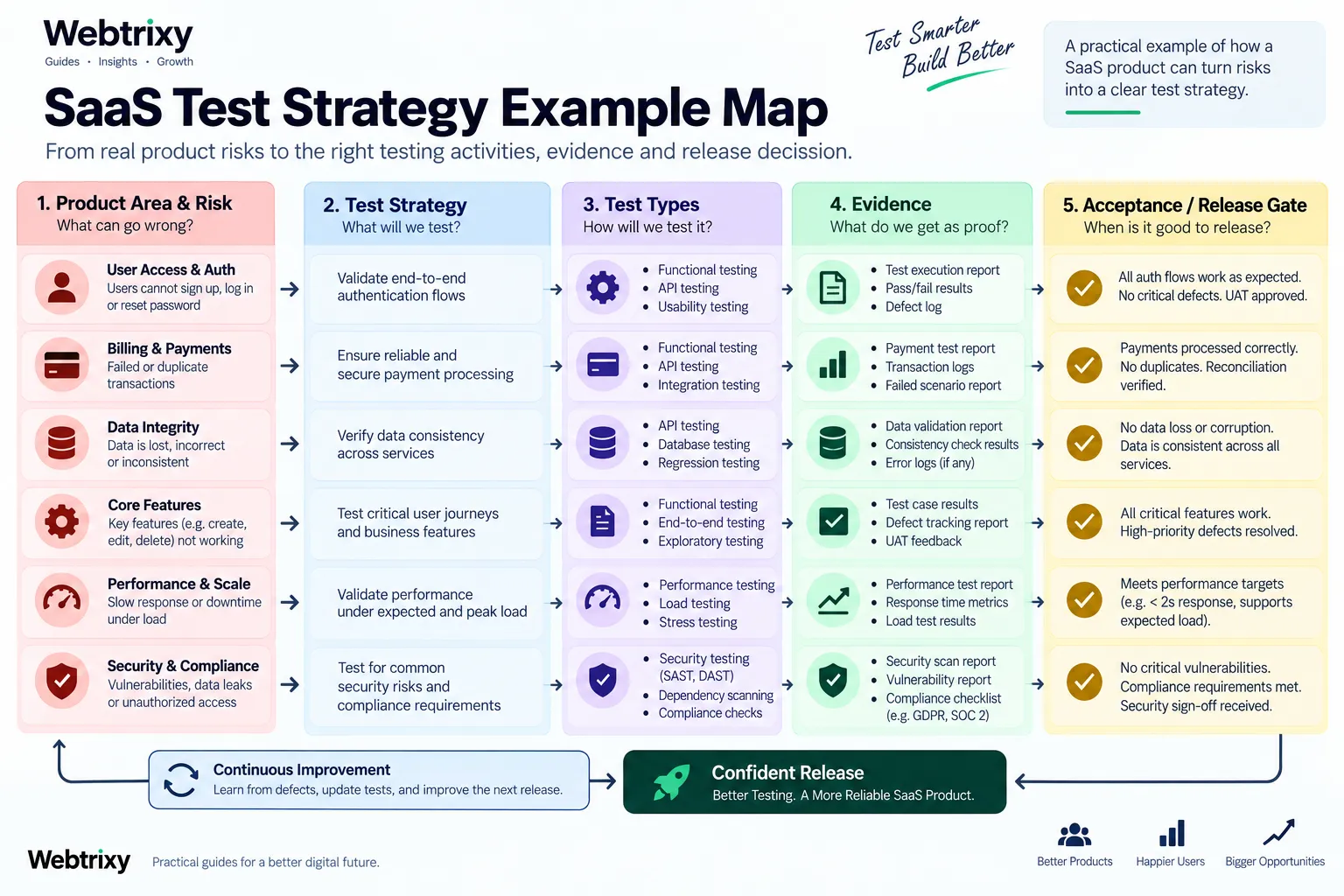
Consider a fictional project-management SaaS product with workspaces, file uploads, role-based access, task notifications, and subscriptions. This test strategy example is small enough to audit.
Risk-to-Evidence Map for the SaaS Product
| Priority risk | Required evidence | Main test approach | Release gate |
|---|---|---|---|
| Cross-tenant file access | Every role and ownership boundary rejects unauthorized reads | API permission matrix, integration tests, focused security review | No unresolved cross-tenant access failure |
| Duplicate subscription charge | Repeated and timed-out requests produce one valid charge | Unit tests for idempotency, gateway sandbox tests, API regression | Billing retry suite passes |
| Lost task update | Saved changes survive retries and concurrent edits | Database integration and concurrency tests | No unresolved data-loss defect |
| Slow project dashboard | Agreed high-use views meet an approved response target under a defined workload | Performance test with fixed dataset and workload | Product owner accepts measured result |
Each row links possible harm to evidence and a release decision. No single test removes the risk. The table shows the minimum agreed evidence.
Execution and Ownership Decisions
Developers own unit and component tests. Quality engineers maintain cross-service risk coverage and exploratory charters. Platform engineers own environment health, deployment checks, and pipeline visibility. The product owner confirms business impact and accepts documented business exceptions. A security reviewer approves exceptions involving cross-tenant access.
Fast checks run on pull requests. API and integration suites run after deployment to the test environment. Critical end-to-end and performance checks run before a production release when the related component changed. Production smoke checks and alerts provide evidence for failures that pre-release environments cannot reproduce fully.
This software testing strategy guide example leaves sprint schedules, named builds, and individual cases to release plans. That separation keeps the strategy stable while execution details change.
How Should You Review and Maintain the Strategy?
Review a strategy when its assumptions or risk profile change, not just on a fixed calendar. Useful triggers include a production incident, architectural migration, new integration, compliance change, major traffic shift, new user role, altered release frequency, or repeated flaky automation.
Use a Short Strategy Review Checklist
Ask these questions during review:
-
Are the highest-ranked risks still the failures that would cause the most harm?
-
Did recent incidents expose an unlisted risk or weak evidence?
-
Does every critical risk have an owner and a testable response?
-
Are environments and datasets still representative enough for the decisions being made?
-
Have slow or flaky checks reduced trust in release results?
-
Do the exit criteria lead to clear decisions, including exceptions?
-
Can obsolete tests, tools, or document sections be removed?
Update the decision and record why it changed. Changing only the “last updated” date provides no value. A maintained software testing strategy guide should show the risk, evidence, constraint, or ownership decision that justified the revision.
Frequently Asked Questions About Software Testing Strategy
Who Should Write a Software Test Strategy?
A test or quality lead may coordinate the document, but product, development, operations, security, and business owners should contribute. The author needs access to people who understand customer harm, architecture, production behaviour, and release authority. Quality risk cannot be assessed accurately by one department in isolation.
How Long Should a Test Strategy Be?
A test strategy should be only as long as needed to make its decisions clear. A small product may use a one-page canvas plus a risk table. A regulated or distributed system may need supporting environment, traceability, security, and governance records. Length is not a quality measure.
Should Agile and DevOps Teams Have a Test Strategy?
Yes. Agile and DevOps teams still need shared rules for risk, coverage, evidence, and release decisions. The strategy can be stored as version-controlled documentation and reviewed with architecture or operational changes. Release-specific execution can remain in backlogs, pipelines, and test-management tools. The guide to testing basics for fast-moving development teams explains how those fundamentals fit shorter delivery cycles.
What Is the Best Way to Start a Software Testing Strategy?
Start with five to ten specific failure events that could harm customers or the business. Rank them, define the evidence needed for each, and assign an owner. This creates a usable first version faster than beginning with a long list of tools or testing types.
Use this software testing strategy guide as a decision framework, then keep the release plan focused on execution. When every major test can be traced to a risk and every release gate has an accountable owner, the strategy can guide real work instead of sitting unread. Revisit the software testing strategy guide whenever the product's risk model changes.





Leave a Reply